
影响页面:/wp-login.php?action=register
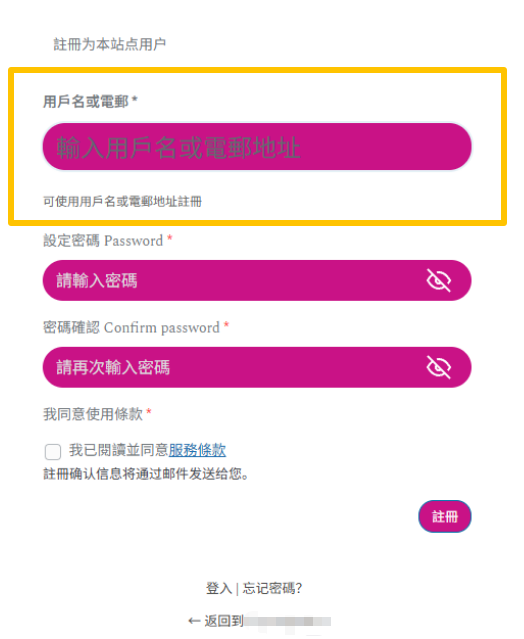
修改后效果(图中密码是另外使用ACF添加的自定义字段,默认是没有的):
在functions.php添加二次开发代码或使用code snippets添加:
add_action('login_enqueue_scripts', function() {
    if (isset($_GET['action']) && $_GET['action'] === 'register') {
        ?>
        <style>
            /* 隐藏原始的两个输入框 */
            #registerform #user_login,
            #registerform #user_email {
                display: none !important;
            }

            /* 隐藏原始的标签 */
            #registerform label[for="user_login"],
            #registerform label[for="user_email"] {
                display: none !important;
            }

            /* 新的统一输入框样式 */
            #registerform .custom-login-wrapper {
                margin-bottom: 20px;
            }

            #registerform .custom-login-wrapper label {
                display: block;
                margin-bottom: 8px;
                font-weight: 600;
                color: #333;
            }

            #registerform .custom-login-wrapper input {
                width: 100%;
                padding: 10px;
                border: 1px solid #999;
                border-radius: 3px;
                font-size: 14px;
                box-sizing: border-box;
            }

            #registerform .custom-login-wrapper input:focus {
                outline: none;
                border-color: #0073aa;
                box-shadow: 0 0 0 2px rgba(0, 115, 170, 0.1);
            }

            #registerform .input-hint {
                font-size: 12px;
                color: #666;
                margin-top: 5px;
                display: block;
            }
        </style>

        <script>
            document.addEventListener('DOMContentLoaded', function() {
                // 在注册表单中插入新的统一输入框
                const registerForm = document.getElementById('registerform');
                if (registerForm) {
                    // 创建新的输入框容器
                    const customWrapper = document.createElement('div');
                    customWrapper.className = 'custom-login-wrapper';
                    customWrapper.innerHTML = `
                        <label for="user_login_email">
                            用戶名或電郵
                            <span class="required">*</span>
                        </label>
                        <input
                            type="text"
                            name="user_login_email"
                            id="user_login_email"
                            class="input"
                            placeholder="輸入用戶名或電郵地址"
                            autocomplete="off"
                            required
                        >
                        <span class="input-hint">可使用用戶名或電郵地址註冊</span>
                    `;

                    // 将新输入框插入到原来用户名的位置
                    const userLoginInput = registerForm.querySelector('input[name="user_login"]');
                    if (userLoginInput) {
                        userLoginInput.parentNode.insertBefore(customWrapper, userLoginInput);
                    }

                    // 表单提交时的处理
                    registerForm.addEventListener('submit', function(e) {
                        const loginEmailValue = document.getElementById('user_login_email').value.trim();

                        if (!loginEmailValue) {
                            e.preventDefault();
                            alert('請填寫用戶名或電郵地址');
                            document.getElementById('user_login_email').focus();
                            return false;
                        }

                        // 根据输入内容判断是用户名还是邮箱
                        if (isValidEmail(loginEmailValue)) {
                            // 是邮箱
                            document.getElementById('user_email').value = loginEmailValue;
                            document.getElementById('user_login').value = '';
                        } else {
                            // 是用户名
                            document.getElementById('user_login').value = loginEmailValue;
                            document.getElementById('user_email').value = 'temp@noemail.local';
                        }
                    });
                }

                function isValidEmail(email) {
                    const re = /^[^\s@]+@[^\s@]+\.[^\s@]+$/;
                    return re.test(email);
                }
            });
        </script>
        <?php
    }
});

// 第一步:最早的钩子 - 处理 POST 数据
add_action('init', function() {
    if ($_SERVER['REQUEST_METHOD'] === 'POST' && isset($_POST['user_login_email'])) {
        $login_email_input = sanitize_text_field($_POST['user_login_email']);

        if (empty($login_email_input)) {
            return;
        }

        // 判断是邮箱还是用户名
        if (is_email($login_email_input)) {
            // 是邮箱
            $_POST['user_email'] = sanitize_email($login_email_input);

            // 从邮箱生成用户名
            $username = sanitize_user(explode('@', $login_email_input)[0], true);

            // 处理用户名冲突
            $counter = 1;
            $original_username = $username;
            while (username_exists($username)) {
                $username = $original_username . $counter;
                $counter++;
            }

            $_POST['user_login'] = $username;
        } else {
            // 是用户名
            $username = sanitize_user($login_email_input, true);
            $_POST['user_login'] = $username;

            // 生成虚拟邮箱 - 确保格式正确
            $_POST['user_email'] = $username . '_' . time() . '@noemail.local';
        }
    }
}, 1);

// 第二步:验证之前处理
add_filter('registration_errors', function($errors, $sanitized_user_login, $user_email) {
    // 移除邮箱相关的错误
    if (isset($errors->errors['user_email'])) {
        unset($errors->errors['user_email']);
    }
    if (isset($errors->errors['email'])) {
        unset($errors->errors['email']);
    }

    return $errors;
}, 10, 3);

// 第三步:防止邮箱验证中断
add_filter('pre_get_user_by_email', function($user, $email) {
    // 如果是虚拟邮箱,返回 null 避免冲突检查
    if (strpos($email, '@noemail.local') !== false) {
        return null;
    }
    return $user;
}, 10, 2);

// 第四步:处理 Multisite 验证
add_filter('wpmu_validate_user_signup', function($result) {
    $login_email_input = isset($_POST['user_login_email']) ? sanitize_text_field($_POST['user_login_email']) : '';

    if (!empty($login_email_input)) {
        if (is_email($login_email_input)) {
            // 邮箱逻辑
            $email = sanitize_email($login_email_input);
            $_POST['user_email'] = $email;
            $result['user_email'] = $email;

            $username = sanitize_user(explode('@', $email)[0], true);

            $counter = 1;
            $original_username = $username;
            while (username_exists($username)) {
                $username = $original_username . $counter;
                $counter++;
            }

            $_POST['user_login'] = $username;
            $result['user_login'] = $username;
        } else {
            // 用户名逻辑
            $username = sanitize_user($login_email_input, true);
            $_POST['user_login'] = $username;
            $result['user_login'] = $username;

            $virtual_email = $username . '_' . time() . '@noemail.local';
            $_POST['user_email'] = $virtual_email;
            $result['user_email'] = $virtual_email;
        }
    }

    // 移除邮箱错误
    if (isset($result['errors']->errors['user_email'])) {
        unset($result['errors']->errors['user_email']);
    }

    return $result;
});

// 第五步:虚拟邮箱处理 - 邮件转发
add_filter('wp_mail', function($args) {
    if (isset($args['to']) && strpos($args['to'], '@noemail.local') !== false) {
        // 记录原始收件人
        $original_to = $args['to'];

        // 转发到管理员
        $admin_email = get_option('admin_email');
        $args['to'] = $admin_email;

        // 在邮件中标注原始收件人
        $args['message'] = "【虛擬郵箱用戶郵件】\n原始收件人: {$original_to}\n\n" . $args['message'];
    }
    return $args;
});

// 第六步:用户资料页面提示
add_action('show_user_profile', function($user) {
    if (strpos($user->user_email, '@noemail.local') !== false) {
        ?>
        <div class="notice notice-warning inline" style="margin-bottom: 20px;">
            <p>
                <strong>⚠️ 提示:</strong> 你的賬戶使用了虛擬電郵地址。
                <br>建議補充真實電郵地址以接收重要通知和密碼重置。
            </p>
        </div>
        <?php
    }
});

// 第七步:密码重置处理
add_filter('allow_password_reset', function($allow, $user_id) {
    $user = get_user_by('id', $user_id);
    if ($user && strpos($user->user_email, '@noemail.local') !== false) {
        // 虚拟邮箱用户不能通过邮件重置密码
        return false;
    }
    return $allow;
}, 10, 2);

// 第八步:登录日志记录
add_action('wp_login', function($user_login, $user) {
    if (strpos($user->user_email, '@noemail.local') !== false) {
        error_log("虛擬郵箱用戶登入: {$user_login} ({$user->user_email}) | IP: {$_SERVER['REMOTE_ADDR']}");
    }
}, 10, 2);
关键特效总结
✅ 单一输入框 - 合并用户名和邮箱字段,简化注册流程
✅ 自动判断邮箱/用户名 - 根据输入格式自动识别(包含@符号判定为邮箱)
✅ 自动生成用户名 - 用邮箱前缀或输入内容自动生成,无需用户手动输入
✅ 冲突自动处理 - 用户名重复时自动添加数字后缀(如:john → john1 → john2)
✅ 虚拟邮箱生成 - 仅填用户名时,自动生成虚拟邮箱(username_timestamp@noemail.local)
✅ 虚拟邮箱转发到管理员 - 系统邮件自动转发给管理员,虚拟邮箱用户不会收不到通知
✅ 用户可在资料页补充真实邮箱 - 用户后续可随时更新真实邮箱地址
✅ 虚拟邮箱用户保护 - 虚拟邮箱用户不能通过邮件重置密码(防止账户被锁定)
✅ 登录日志记录 - 虚拟邮箱用户登录时自动记录,便于审计和管理
✅ 前端即时验证 - 提交前检查是否填写,避免无效提交
✅ 多站点兼容 - 支持 WordPress Multisite 环境
✅ 繁体中文支持 - 完整的繁体中文界面和提示文本