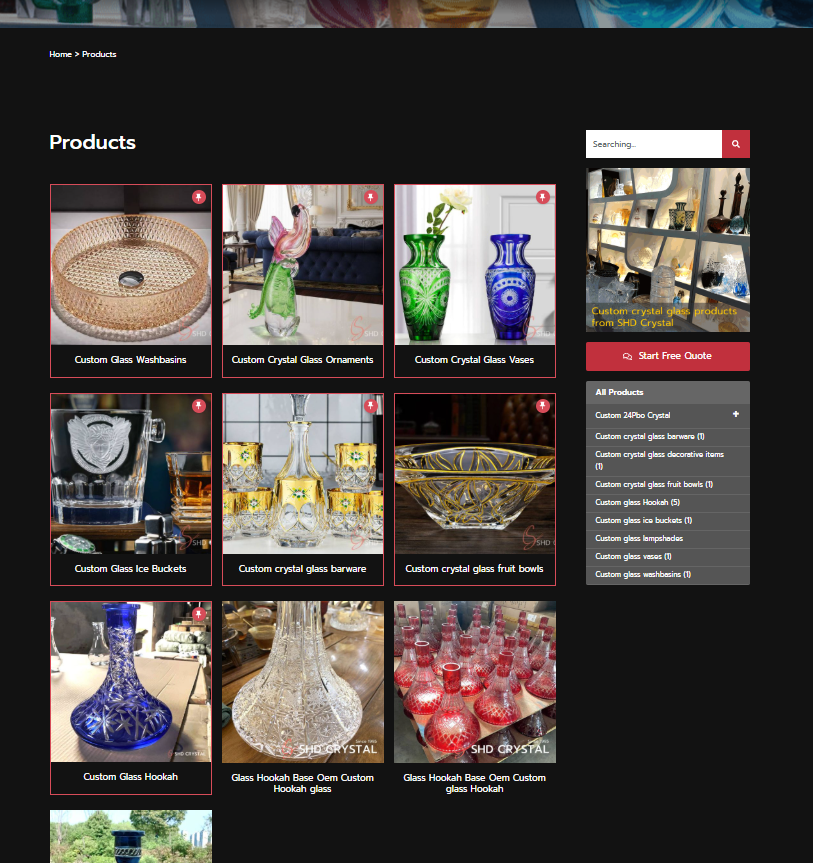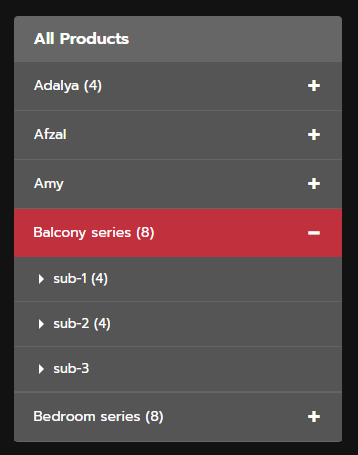

Product或Blog分类下侧边栏
效果:
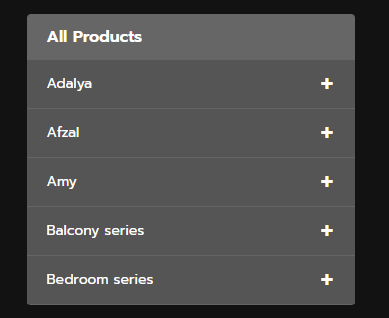
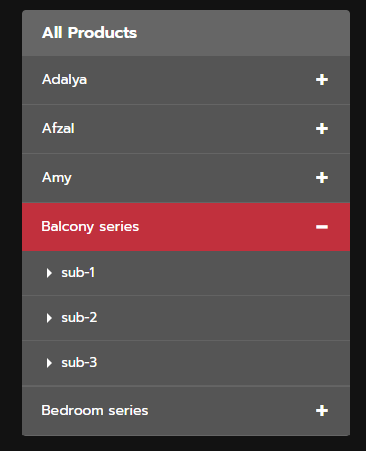
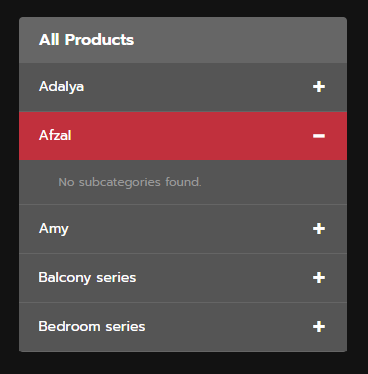
需要指定要自动获取哪个分类下的所有子分类,这个案例考虑到一个程序即可满足多个网页分别调用自己的不同分类的情况
/**
 * 统一的分类过滤器短代码
 * 根据 'type' 属性显示产品分类或博客分类。
 * 用法:
 * [unified_category_filter type="product"] 显示产品分类 (ID: 58)
 * [unified_category_filter type="blog"]    显示博客分类 (ID: 54)
 */
add_shortcode('unified_category_filter', function($atts) {
  // 解析短代码属性
  $atts = shortcode_atts(
    array(
      'type' => 'product', // 默认类型为 'product'
    ),
    $atts,
    'unified_category_filter'
  );

  $top_level_parent_id = 0; // 初始化顶级父分类ID
  $all_items_text = '';     // 初始化标题文本
  $current_filter_type = $atts['type']; // 获取当前的过滤器类型

  // 根据类型设置不同的父分类ID和文本
  if ($current_filter_type === 'product') {
    $top_level_parent_id = 58; // 产品的顶级父分类ID
    $all_items_text = 'All Products';
  } elseif ($current_filter_type === 'blog') {
    $top_level_parent_id = 54; // 博客的顶级父分类ID
    $all_items_text = 'All Blogs';
  } else {
    // 如果类型不识别,可以返回错误或默认值
    return '<p>Invalid filter type specified for [unified_category_filter].</p>';
  }

  // 获取一级分类 (top_level_parent_id 的子分类)
  $level1_terms = get_terms(array(
    'taxonomy' => 'category',
    'parent' => $top_level_parent_id,
    'hide_empty' => false, // 显示所有分类,即使它们没有文章
    'orderby' => 'name',
    'order' => 'ASC'
  ));

  // 如果没有找到一级分类,则返回错误信息
  if (is_wp_error($level1_terms) || empty($level1_terms)) {
    return '<p>No subcategories found for the specified parent (' . $top_level_parent_id . ').</p>'; // 用户可见文本为英文
  }

  // 根据当前页面/分类判断哪个手风琴项应该展开
  $current_term_id = get_queried_object_id();
  $should_expand = false; // 存储需要展开的一级分类的 term_id

  if ($current_term_id) {
    $current_term = get_term($current_term_id);
    if ($current_term && !is_wp_error($current_term)) {
      $level1_ids = wp_list_pluck($level1_terms, 'term_id'); // 获取所有一级分类的ID

      // 检查当前分类是否是某个一级分类的子分类
      if (in_array($current_term->parent, $level1_ids)) {
        $should_expand = $current_term->parent;
      }
      // 检查当前分类本身是否就是一级分类
      elseif (in_array($current_term_id, $level1_ids)) {
        $should_expand = $current_term_id;
      }
    }
  }

  // 启动输出缓冲以捕获HTML
  ob_start();
  ?>
  <div class="category-filter-sidebar" id="category-accordion-<?php echo time() . '-' . $current_filter_type; ?>">
    <h3>
      <a href="<?php echo esc_url(get_term_link($top_level_parent_id, 'category')); ?>"><?php echo esc_html($all_items_text); ?></a>
    </h3>
    <div class="accordion-container">
      <?php foreach ($level1_terms as $level1_term): ?>
        <?php
        // 检查当前一级分类是否应该展开
        $is_expanded = ($should_expand === $level1_term->term_id);

        // 获取二级分类 (当前一级分类的子分类)
        $level2_terms = get_terms(array(
          'taxonomy' => 'category',
          'parent' => $level1_term->term_id,
          'hide_empty' => false, // 显示所有分类,即使它们没有文章
          'orderby' => 'name',
          'order' => 'ASC'
        ));
        ?>
        <div class="accordion-item">
          <div class="accordion-header <?php echo $is_expanded ? 'expanded' : ''; ?>" onclick="toggleAccordion(this, event)">
            <span class="accordion-toggle"><?php echo $is_expanded ? '−' : '+'; ?></span>
            <a href="<?php echo esc_url(get_term_link($level1_term)); ?>" class="level1-name">
              <?php echo esc_html($level1_term->name); ?>
            </a>
          </div>

          <div class="accordion-content <?php echo $is_expanded ? 'show' : ''; ?>" style="display: <?php echo $is_expanded ? 'block' : 'none'; ?>;">
            <?php if (!empty($level2_terms) && !is_wp_error($level2_terms)): ?>
              <ul class="level2-list">
                <?php foreach ($level2_terms as $level2_term): ?>
                  <li class="level2-item">
                    <a href="<?php echo esc_url(get_term_link($level2_term)); ?>" class="level2-name">
                      <?php echo esc_html($level2_term->name); ?>
                    </a>
                  </li>
                <?php endforeach; ?>
              </ul>
            <?php else: ?>
              <p class="no-subcategories">No subcategories found.</p> <!-- 用户可见文本为英文 -->
            <?php endif; ?>
          </div>
        </div>
      <?php endforeach; ?>
    </div>
  </div>

  <script>
  /**
   * 切换手风琴的展开/折叠状态。
   * @param {HTMLElement} header - 被点击的手风琴标题元素。
   * @param {Event} event - 点击事件对象。
   */
  function toggleAccordion(header, event) {
    var content = header.nextElementSibling; // 获取手风琴内容区域
    var toggle = header.querySelector('.accordion-toggle'); // 获取加/减号切换图标
    var target = event.target; // 获取实际点击的DOM元素

    // 如果点击目标是<a>标签,并且该<a>标签位于当前手风琴标题内部
    // 则不阻止默认行为,让链接正常跳转,也不执行手风琴的展开/折叠逻辑。
    if (target.tagName === 'A' && target.closest('.accordion-header') === header) {
      return; // 允许链接跳转
    }

    // 如果不是点击链接,则阻止事件的默认行为 (例如,防止点击文本时页面滚动)
    event.preventDefault();

    // 切换header和content的'expanded'和'show'类
    header.classList.toggle('expanded');
    content.classList.toggle('show');

    // 根据展开状态更新加/减号图标和内容区域的显示样式
    if (header.classList.contains('expanded')) {
      toggle.textContent = '−'; // 展开时显示减号
      content.style.display = 'block'; // 显示内容
    } else {
      toggle.textContent = '+'; // 折叠时显示加号
      content.style.display = 'none'; // 隐藏内容
    }
  }
  </script>
  <?php
  // 结束输出缓冲并返回捕获到的HTML
  return ob_get_clean();
});
下面是CSS:
/*product sider*/
.category-filter-sidebar {
	background:#666;
  padding: 0;
  border-radius: 4px;
  margin: 0;
}

.category-filter-sidebar h3 {
	padding:15px 20px;
	font-size: 16px;
	line-height:1;
	text-align:left;
	color: #aaa;
	font-weight: 600;
}

.accordion-container {
  display: flex;
  flex-direction: column;
  gap: 0;
}

.accordion-item {
  border-bottom:1px solid rgb(85 85 85 / 10%);
  overflow: hidden;
}

.accordion-header {
	background: #555;
	padding: 5px 20px;
	cursor: pointer;
	display: flex;
	flex-direction: row-reverse;
	align-items: center;
	gap: 10px;
	transition: background 0.2s;
	font-weight: 600;
	color:#fff;
	user-select: none;
}

.accordion-header:hover {
  background: #C1303D;
}

.accordion-header.expanded {
  background: #C1303D;
}

.accordion-toggle {
  width: 15px;
  text-align: center;
  font-size:35px;
	padding-bottom:3px;
	line-height:1;
  color: #fff;
  font-weight: normal;
  display: inline-block;
}

.level1-name {
  color: #0073aa;
  text-decoration: none;
  flex: 1;
  font-size: 14px;
	font-weight:normal;
}

.level1-name:hover {
  text-decoration: underline;
}

.accordion-content {
  background: #555;
  padding: 0;
  max-height: 0;
  overflow: hidden;
  transition: max-height 0.3s ease;
}

.accordion-content.show {
  max-height: 1000px;
}

.level2-list {
  list-style: none;
  margin: 0;
  padding: 0;
}

.level2-item {
  padding: 0;
  margin: 0;
}

.level2-name {
  display: block;
  padding: 10px 15px 10px 40px;
  color: #666;
  text-decoration: none;
  font-size: 13px;
  border-bottom:1px solid rgb(155 155 155 / 20%);
  transition: background 0.2s, color 0.2s;
	position:relative;
}
.level2-name:before{
	content:'';
	position:absolute;
	bottom:17px;
	left:25px;;
	width:0px;
	height:0px;
	display:block;
	border-bottom:5px solid transparent;
	border-right:5px solid transparent;
	border-top:5px solid transparent;
	border-left:5px solid #fff;
}

.level2-name:hover {
  background: #C1303D;
  color:#fff!important;
}

.no-subcategories {
  padding: 10px 15px 10px 40px;
  color: #999;
  font-size: 12px;
  margin: 0;
  border-bottom:0;
}