
WordPress默认的注册页:/wp-login.php?action=register
我们上一篇文章讲了如何使用ACF给默认注册页的表单添加密码字段,那这篇我们继续改造,把ACF添加的新密码字段实现点击切换显示密码/隐藏密码的功能。
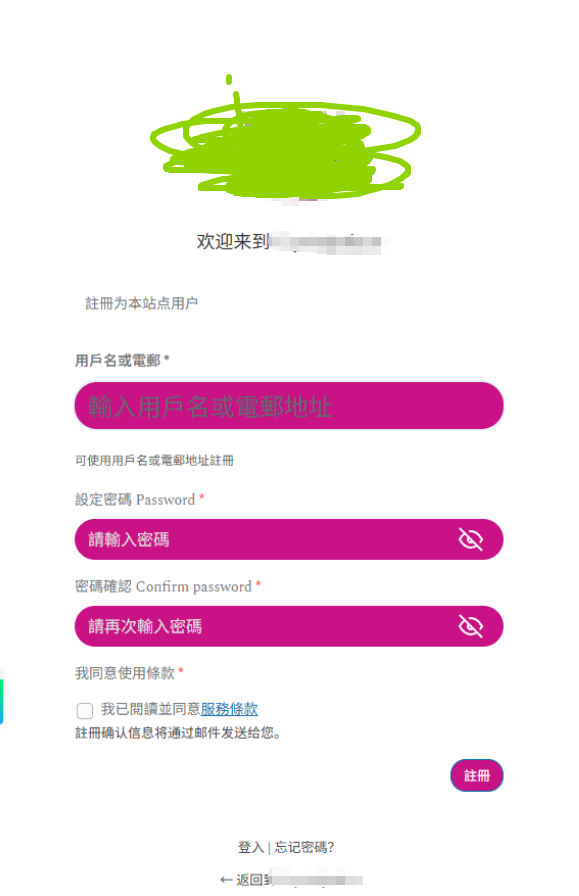
这里牵扯到CSS,其中我们给两个密码输入框分别添加了不同的小眼睛SVG图标,实现睁眼/闭眼的效果来引导客户是否显示/隐藏密码。
另外客户还想实现默认注册和登录页的文字强行替换、并自定义logo、以及logo下添加文字等。最终效果如图:
下面我就分别拆成不同的代码。
以下应该在functions.php添加二次开发代码或使用code snippets添加:
add_action('login_head', function() {
    if (isset($_GET['action']) && $_GET['action'] === 'register') {
        echo '<style>
            /* 隐藏标题 */
            #registerform h2 {
                display: none !important;
            }
			#login form .input{
			color:#fff;
			}
			#login form{
			padding:10px 20px;
			}

            /* 密码字段自定义样式 */
            .acf-field-password {
                margin: 15px 0;
            }
            .acf-field-password .acf-label label {
                display: block;
                margin-bottom: 8px;
                font-weight: 500;
            }
            .acf-field-password .acf-input-wrap {
                position: relative;
                display: flex;
                align-items: center;
            }
            .acf-field input[type=text], .acf-field input[type=password], .acf-field input[type=date], .acf-field input[type=datetime], .acf-field input[type=datetime-local], .acf-field input[type=email], .acf-field input[type=month], .acf-field input[type=number], .acf-field input[type=search], .acf-field input[type=tel], .acf-field input[type=time], .acf-field input[type=url], .acf-field input[type=week], .acf-field textarea, .acf-field select{
                flex: 1;
                padding: .1875rem .3125rem;
						padding-left:13px;
						padding-top:7px;
						padding-bottom:7px;
						margin:0 0 16px 0;
                border-radius: 22px;
                font-size: 16px;
						background:#c91286;
						line-height:1.3333333;
						min-height:40px;
						color:#fff;
						border:0;
						box-shadow:0 0 0 transparent;
            }
						.acf-field-password input:focus {
							outline: none!important;
						}
						/* Chrome, Firefox, Opera, Safari */
						.acf-field-password input::placeholder {
							color: #ddd;
							opacity: 1;
							font-size: 16px;
						}
						/* Firefox 专用 */
						.acf-field-password input::-moz-placeholder {
							color: #ddd;
							opacity: 1;
						}
						/* IE 10-11 */
						.acf-field-password input::-ms-input-placeholder {
							color: #ddd;
						}
						/* Edge */
						.acf-field-password input::-ms-input-placeholder {
							color: #ddd;
						}

            /* 眼睛图标按钮 */
            .password-toggle-btn {
                position: absolute;
						top:0;
                right: 12px;
                background: none;
                border: none;
                cursor: pointer;
                padding: 5px 8px;
                color: #666;
                z-index: 10;
                width: 40px;
                height: 40px;
                display: flex;
                align-items: center;
                justify-content: center;
            }

            /* 密码隐藏状态 - 显示眼睛图标 */
            .password-toggle-btn.password-hidden::before {
                content: "";
                display: block;
                width: 32px;
                height: 32px;
						background-image: url("data:image/svg+xml,%3Csvg xmlns=%27http://www.w3.org/2000/svg%27 viewBox=%270 0 24 24%27 fill=%27none%27 stroke=%27%23fff%27 stroke-width=%272%27%3E%3Cpath d=%27M17.94 17.94A10.07 10.07 0 0 1 12 20c-7 0-11-8-11-8a18.45 18.45 0 0 1 5.06-5.94M9.9 4.24A9.12 9.12 0 0 1 12 4c7 0 11 8 11 8a18.5 18.5 0 0 1-2.16 3.19m-6.72-1.07a3 3 0 1 1-4.24-4.24%27%3E%3C/path%3E%3Cline x1=%271%27 y1=%271%27 x2=%2723%27 y2=%2723%27%3E%3C/line%3E%3C/svg%3E");
                background-size: contain;
                background-repeat: no-repeat;
                background-position: center;
            }

            /* 密码显示状态 - 显示眼睛禁用图标 */
            .password-toggle-btn.password-visible::before {
                content: "";
                display: block;
                width: 32px;
                height: 32px;
						background-image: url("data:image/svg+xml,%3Csvg xmlns=%27http://www.w3.org/2000/svg%27 viewBox=%270 0 24 24%27 fill=%27none%27 stroke=%27%23fff%27 stroke-width=%272%27%3E%3Cpath d=%27M1 12s4-8 11-8 11 8 11 8-4 8-11 8-11-8-11-8z%27%3E%3C/path%3E%3Ccircle cx=%2712%27 cy=%2712%27 r=%273%27%3E%3C/circle%3E%3C/svg%3E");
                background-size: contain;
                background-repeat: no-repeat;
                background-position: center;
            }

            .password-toggle-btn:hover {
                opacity: 0.7;
            }

            /* 同意条款字段 */
            .acf-field-checkbox {
                margin: 15px 0;
            }
            .acf-field-checkbox .acf-label label {
                display: block;
                margin-bottom: 10px;
                font-weight: 500;
            }
            .acf-checkbox-list li {
                list-style: none;
            }
            .acf-checkbox-list label {
                display: flex;
                align-items: center;
                cursor: pointer;
            }
            .acf-checkbox-list input[type="checkbox"] {
                margin-right: 8px;
                cursor: pointer;
            }
					.acf-fields.-clear>.acf-field{
						margin:0;
					}
        </style>';
    }
});

// 密码显示/隐藏功能
add_action('login_footer', function() {
if (isset($_GET['action']) && $_GET['action'] === 'register') {
echo '<script>
document.addEventListener("DOMContentLoaded", function() {
// ========== 密码显示/隐藏功能 ==========
const passwordInputs = document.querySelectorAll(".acf-field-password input[type=\"password\"]");

passwordInputs.forEach((input, index) => {
const wrapper = input.parentElement;

// 创建眼睛按钮
const toggleBtn = document.createElement("button");
toggleBtn.type = "button";
toggleBtn.className = "password-toggle-btn password-hidden";
toggleBtn.title = "顯示密碼";
toggleBtn.style.pointerEvents = "auto";

wrapper.style.position = "relative";
wrapper.appendChild(toggleBtn);

// 切换显示/隐藏
toggleBtn.addEventListener("click", function(e) {
e.preventDefault();
e.stopPropagation();

if (input.type === "password") {
input.type = "text";
toggleBtn.classList.remove("password-hidden");
toggleBtn.classList.add("password-visible");
toggleBtn.title = "隱藏密碼";
} else {
input.type = "password";
toggleBtn.classList.remove("password-visible");
toggleBtn.classList.add("password-hidden");
toggleBtn.title = "顯示密碼";
}
});
});
});
</script>';
}
});
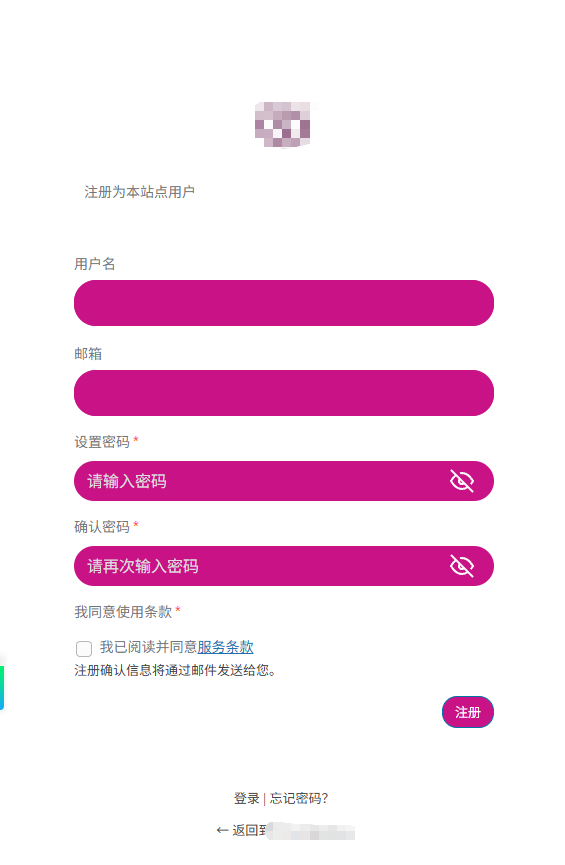
实现后效果如下图:
那我们继续:
客户的网站是简体中文,不希望改变语言,但希望把默认注册页和登录页的文字替换为繁体。以下为替换成台湾繁体字/正体字为例,同时兼顾注册页和登录页:
// 通过 JavaScript 直接修改注册页文字为台湾正体

// WordPress 登录页和注册页 - 台湾正体中文翻译

add_action('login_enqueue_scripts', function() {
    ?>
    <script>
        document.addEventListener('DOMContentLoaded', function() {
            // 简体到繁体的对照表
            const translations = {
                '用户名': '用戶名 Username *',
                '电子邮箱': '電郵 Email *',
                '邮箱': '電郵 Email *',
                '密码': '密碼',
                '请输入密码': '請輸入密碼',
                '请再次输入密码': '請再次輸入密碼',
                '确认密码': '確認密碼',
                '注册': '註冊',
                '注册为本站点用户': '註冊為本站點用戶',
                '注册确认信息将通过邮件发送给您': '註冊確認信息將透過電郵發送給您',
                '注册确认信息将通过邮件发送给您。': '註冊確認信息將透過電郵發送給您。',
                '密码将通过邮件发送给您。': '密碼將透過電郵發送給您。',
                '我同意使用条款': '我同意使用條款',
                '我已阅读并同意服务条款': '我已閱讀並同意服務條款',
                '隐藏密码': '隱藏密碼',
                '显示密码': '顯示密碼',
                '返回': '返回',
                '返回登录': '返回登入',
                '登录': '登入',
                '记住我': '記住我',
                '忘记密码': '忘記密碼',
                '忘记密码?': '忘記密碼?',
                '返回到': '返回到',
                '丢失你的密码': '丟失你的密碼',
                '获取新密码': '獲取新密碼',
                '重设密码': '重設密碼',
                '有账号吗?': '有帳號嗎?',
                '没有账号?': '沒有帳號?',
                '立即注册': '立即註冊',
            };

            // 方法 1:替换文本节点(处理文字)
            const walker = document.createTreeWalker(
                document.body,
                NodeFilter.SHOW_TEXT,
                null,
                false
            );

            let node;
            const nodesToReplace = [];
            while (node = walker.nextNode()) {
                nodesToReplace.push(node);
            }

            nodesToReplace.forEach(node => {
                let text = node.textContent;
                let modified = false;

                Object.entries(translations).forEach(([simplified, traditional]) => {
                    if (text.includes(simplified)) {
                        text = text.split(simplified).join(traditional);
                        modified = true;
                    }
                });

                if (modified) {
                    node.textContent = text;
                }
            });

            // 方法 2:替换属性值(value、title、placeholder 等)
            document.querySelectorAll('*').forEach(el => {
                // value 属性(按钮文字)
                if (el.hasAttribute('value')) {
                    let value = el.getAttribute('value');
                    Object.entries(translations).forEach(([simplified, traditional]) => {
                        if (value.includes(simplified)) {
                            value = value.split(simplified).join(traditional);
                        }
                    });
                    el.setAttribute('value', value);
                }

                // placeholder 属性
                if (el.hasAttribute('placeholder')) {
                    let placeholder = el.getAttribute('placeholder');
                    Object.entries(translations).forEach(([simplified, traditional]) => {
                        if (placeholder.includes(simplified)) {
                            placeholder = placeholder.split(simplified).join(traditional);
                        }
                    });
                    el.setAttribute('placeholder', placeholder);
                }

                // title 属性
                if (el.hasAttribute('title')) {
                    let title = el.getAttribute('title');
                    Object.entries(translations).forEach(([simplified, traditional]) => {
                        if (title.includes(simplified)) {
                            title = title.split(simplified).join(traditional);
                        }
                    });
                    el.setAttribute('title', title);
                }

                // aria-label 属性
                if (el.hasAttribute('aria-label')) {
                    let ariaLabel = el.getAttribute('aria-label');
                    Object.entries(translations).forEach(([simplified, traditional]) => {
                        if (ariaLabel.includes(simplified)) {
                            ariaLabel = ariaLabel.split(simplified).join(traditional);
                        }
                    });
                    el.setAttribute('aria-label', ariaLabel);
                }

                // data-* 属性
                Array.from(el.attributes).forEach(attr => {
                    if (attr.name.startsWith('data-')) {
                        let value = attr.value;
                        Object.entries(translations).forEach(([simplified, traditional]) => {
                            if (value.includes(simplified)) {
                                value = value.split(simplified).join(traditional);
                            }
                        });
                        el.setAttribute(attr.name, value);
                    }
                });
            });

            // 方法 3:特殊处理按钮和输入框
            document.querySelectorAll('input[type="submit"], input[type="button"]').forEach(btn => {
                let value = btn.value;
                Object.entries(translations).forEach(([simplified, traditional]) => {
                    if (value.includes(simplified)) {
                        value = value.split(simplified).join(traditional);
                    }
                });
                btn.value = value;
            });

            // 方法 4:处理复选框标签
            document.querySelectorAll('label').forEach(label => {
                let text = label.textContent;
                Object.entries(translations).forEach(([simplified, traditional]) => {
                    if (text.includes(simplified)) {
                        text = text.split(simplified).join(traditional);
                    }
                });
                label.textContent = text;
            });

            // 方法 5:处理链接文字
            document.querySelectorAll('a').forEach(link => {
                let text = link.textContent;
                Object.entries(translations).forEach(([simplified, traditional]) => {
                    if (text.includes(simplified)) {
                        text = text.split(simplified).join(traditional);
                    }
                });
                link.textContent = text;
            });

            // 方法 6:处理动态加载的内容(MutationObserver)
            const observer = new MutationObserver(function(mutations) {
                mutations.forEach(function(mutation) {
                    mutation.addedNodes.forEach(function(node) {
                        if (node.nodeType === Node.TEXT_NODE) {
                            let text = node.textContent;
                            Object.entries(translations).forEach(([simplified, traditional]) => {
                                if (text.includes(simplified)) {
                                    text = text.split(simplified).join(traditional);
                                }
                            });
                            node.textContent = text;
                        } else if (node.nodeType === Node.ELEMENT_NODE) {
                            // 递归处理新加入的元素
                            const walker2 = document.createTreeWalker(
                                node,
                                NodeFilter.SHOW_TEXT,
                                null,
                                false
                            );
                            let n;
                            while (n = walker2.nextNode()) {
                                let text = n.textContent;
                                Object.entries(translations).forEach(([simplified, traditional]) => {
                                    if (text.includes(simplified)) {
                                        text = text.split(simplified).join(traditional);
                                    }
                                });
                                n.textContent = text;
                            }
                        }
                    });
                });
            });

            observer.observe(document.body, {
                childList: true,
                subtree: true,
                characterData: false
            });
        });

        // 延迟处理,确保所有元素加载完成
        setTimeout(function() {
            const translations = {
                '用户名': '用戶名',
                '电子邮箱': '電郵',
                '邮箱': '電郵',
                '密码': '密碼',
                '请输入密码': '請輸入密碼',
                '请再次输入密码': '請再次輸入密碼',
                '确认密码': '確認密碼',
                '注册': '註冊',
                '注册为本站点用户': '註冊為本站點用戶',
                '注册确认信息将通过邮件发送给您': '註冊確認信息將透過電郵發送給您',
                '注册确认信息将通过邮件发送给您。': '註冊確認信息將透過電郵發送給您。',
                '密码将通过邮件发送给您。': '密碼將透過電郵發送給您。',
                '我同意使用条款': '我同意使用條款',
                '我已阅读并同意服务条款': '我已閱讀並同意服務條款',
                '隐藏密码': '隱藏密碼',
                '显示密码': '顯示密碼',
                '返回': '返回',
                '返回登录': '返回登入',
                '登录': '登入',
                '记住我': '記住我',
                '忘记密码': '忘記密碼',
                '忘记密码?': '忘記密碼?',
                '返回到': '返回到',
            };

            document.querySelectorAll('*').forEach(el => {
                // 处理所有可能的属性
                if (el.hasAttribute('value')) {
                    let value = el.getAttribute('value');
                    Object.entries(translations).forEach(([simplified, traditional]) => {
                        value = value.split(simplified).join(traditional);
                    });
                    el.setAttribute('value', value);
                }

                // 处理文本内容
                if (el.childNodes.length === 1 && el.childNodes[0].nodeType === 3) {
                    let text = el.textContent;
                    Object.entries(translations).forEach(([simplified, traditional]) => {
                        text = text.split(simplified).join(traditional);
                    });
                    el.textContent = text;
                }
            });
        }, 1000);
    </script>
    <?php
}, 99);
客户还希望默认的注册页登录页的logo能否修改,但不引用网站logo。所以我们可以用下面的代码实现并自定义logo、以及logo下添加文字等
// 修改登录页 Logo - 终极方案

add_action('login_enqueue_scripts', function() {
    ?>
    <style>
        /* 替换登录页 Logo 图片 */
        #login-designer-logo,
        body.login #login h1 a {
            background-image: url('你的LOGO网址') !important;
            background-position: center top !important;
            background-size: 133px 109px !important;
            background-repeat: no-repeat !important;
        }

        /* 调整 Logo 大小 */
        body.login #login h1 a {
            width: 350px !important;
            height: 160px !important;  /* 增加高度,为文字留空间 */
            display: block !important;
            position: relative !important;
            padding: 0 !important;
        }

        /* Logo 下添加文字 */
        body.login #login h1 a::after {
            content: '欢迎来到某某某网站';
            position: absolute !important;
            bottom: 0 !important;
            left: 0 !important;
            right: 0 !important;
            color: #333 !important;
            font-size: 18px !important;
            padding: 8px !important;
            text-align: center !important;
            display: block !important;
            width: 100% !important;
            box-sizing: border-box !important;
            margin: 0 !important;
            line-height: 1.4 !important;
				text-indent:0;
        }

        /* 调整整体布局 */
        body.login #login h1 {
            margin-bottom: 10px !important;
        }
    </style>
    <?php
}, 99);
那最后就得到最终效果: