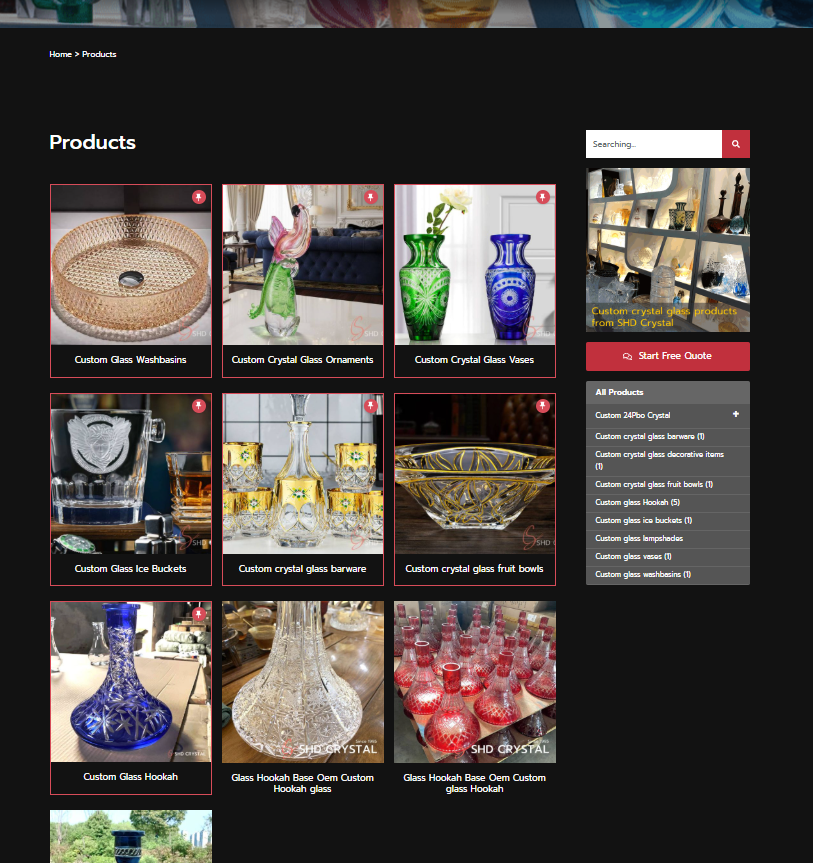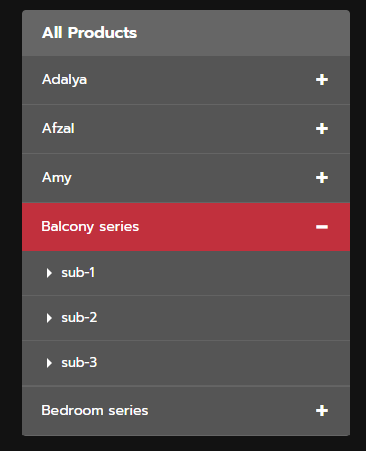

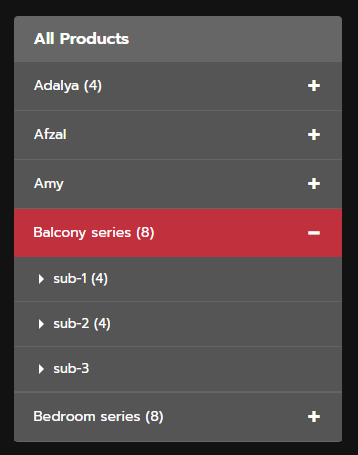
下面是应用方法:
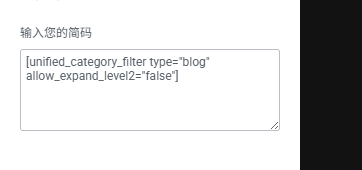

下面是Snippets主程序:
/**
 * 统一的分类过滤器短代码
 * 根据 'type' 属性显示产品分类或博客分类。
 * 用法:
 * [unified_category_filter type="product"] 显示产品分类 (ID: 58)
 * [unified_category_filter type="blog"]    显示博客分类 (ID: 54)
 *
 * 新增需求: 'show_level1_count' 和 'show_level2_count' 在代码内部设置默认值,
 *       但如果短代码提供了这些参数,则以短代码为准。
 * 补充功能: 一级分类的数量现在包含其所有子分类的文章数量。
 * 修正: 移除 post_type 参数,因为所有内容都共享相同的文章类型。
 * 新增功能: 为当前活动分类 (一级或二级) 添加 'current-active' CSS 类。
 * 新增功能: 为 type="blog" 提供选项,可选择不展开二级子分类,直接让一级分类可点击。
 * 修正: 修正了 allow_expand_level2="false" 时一级分类总数不包含子分类数量的问题。
 */
add_shortcode('unified_category_filter', function($atts) {

  // --- 开始:可在 Snippet 内部设置的默认配置项 ---
  // 这些是默认值。如果短代码本身提供了 show_level1_count 或 show_level2_count,
  // 则短代码提供的值会覆盖这里的默认值。
  $default_show_level1_count = true;  // 默认显示一级分类的文章/产品数量
  $default_show_level2_count = true;  // 默认显示二级分类的文章/产品数量

  // 产品分类的顶级父分类ID、文本和分类法
  $product_top_level_parent_id = 58;
  $product_all_items_text = 'All Products';
  $product_taxonomy = 'category';
  $product_allow_expand_level2 = true; // 产品分类默认允许展开二级子分类

  // 博客分类的顶级父分类ID、文本和分类法
  $blog_top_level_parent_id = 54;
  $blog_all_blogs_text = 'Blogs Category';
  $blog_taxonomy = 'category';
  $blog_allow_expand_level2 = false; // 博客分类默认不允许展开二级子分类 (即一级分类直接是链接)
  // --- 结束:可在 Snippet 内部设置的默认配置项 ---


  // 解析短代码属性
  $atts = shortcode_atts(
    array(
      'type'                  => 'product', // 默认类型为 'product'
      'show_level1_count'     => $default_show_level1_count,
      'show_level2_count'     => $default_show_level2_count,
      'allow_expand_level2'   => null, // 允许通过短代码覆盖默认值 (null 表示未指定)
    ),
    $atts,
    'unified_category_filter'
  );

  $top_level_parent_id = 0; // 初始化顶级父分类ID
  $all_items_text = '';     // 初始化标题文本
  $taxonomy = '';           // 初始化分类法
  $current_filter_type = $atts['type']; // 获取当前的过滤器类型
  $allow_expand_level2 = false; // 初始化当前过滤器的二级展开权限

  // 将字符串的 'true'/'false' 转换为布尔值,因为短代码属性总是字符串
  $show_level1_count = filter_var($atts['show_level1_count'], FILTER_VALIDATE_BOOLEAN);
  // 只有当 allow_expand_level2 为 true 时,show_level2_count 才可能为 true
  $show_level2_count_actual = filter_var($atts['show_level2_count'], FILTER_VALIDATE_BOOLEAN);


  // 根据类型设置不同的父分类ID和文本
  if ($current_filter_type === 'product') {
    $top_level_parent_id = $product_top_level_parent_id;
    $all_items_text = $product_all_items_text;
    $taxonomy = $product_taxonomy;
    // 如果短代码明确指定了 'allow_expand_level2',则覆盖默认值,否则使用产品类型的默认值
    $allow_expand_level2 = ($atts['allow_expand_level2'] !== null) ? filter_var($atts['allow_expand_level2'], FILTER_VALIDATE_BOOLEAN) : $product_allow_expand_level2;
  } elseif ($current_filter_type === 'blog') {
    $top_level_parent_id = $blog_top_level_parent_id;
    $all_items_text = $blog_all_blogs_text;
    $taxonomy = $blog_taxonomy;
    // 如果短代码明确指定了 'allow_expand_level2',则覆盖默认值,否则使用博客类型的默认值
    $allow_expand_level2 = ($atts['allow_expand_level2'] !== null) ? filter_var($atts['allow_expand_level2'], FILTER_VALIDATE_BOOLEAN) : $blog_allow_expand_level2;
  } else {
    // 如果类型不识别,返回错误
    return '<p>Invalid filter type specified for [unified_category_filter].</p>';
  }

  // 获取一级分类 (top_level_parent_id 的子分类)
  $level1_terms = get_terms(array(
    'taxonomy' => $taxonomy, // 使用动态分类法
    'parent' => $top_level_parent_id,
    'hide_empty' => false, // 显示所有分类,即使它们没有文章/产品
    'orderby' => 'name',
    'order' => 'ASC',
  ));

  // 如果没有找到一级分类,则返回错误信息
  if (is_wp_error($level1_terms) || empty($level1_terms)) {
    return '<p>No subcategories found for the specified parent (' . $top_level_parent_id . ').</p>';
  }

  // 获取当前正在查看的分类对象
  $current_queried_object = get_queried_object();
  $current_term_id = 0;
  // 确保当前对象是 WP_Term 并且与我们正在处理的分类法一致
  if (is_a($current_queried_object, 'WP_Term') && $current_queried_object->taxonomy === $taxonomy) {
      $current_term_id = $current_queried_object->term_id;
  }


  // 判断哪个一级分类应该展开 (逻辑不变,依然通过父子关系判断)
  $should_expand = false; // 存储需要展开的一级分类的 term_id
  if ($current_term_id) {
    // 检查当前分类是否是某个一级分类的子分类
    foreach ($level1_terms as $l1_term) {
        // 如果当前分类的父ID与一级分类ID相同,说明当前分类是该一级分类的子分类
        if ($current_queried_object->parent === $l1_term->term_id) {
            $should_expand = $l1_term->term_id;
            break;
        }
        // 如果当前分类本身就是某个一级分类
        if ($current_term_id === $l1_term->term_id) {
            $should_expand = $l1_term->term_id;
            break;
        }
    }
  }

  // 启动输出缓冲以捕获HTML
  ob_start();
  ?>
  <div class="category-filter-sidebar" id="category-accordion-<?php echo time() . '-' . $current_filter_type; ?>">
    <h3>
      <a href="<?php echo esc_url(get_term_link($top_level_parent_id, $taxonomy)); ?>"
         <?php if ($current_term_id && $current_term_id === $top_level_parent_id): ?>class="current-active"<?php endif; ?>
      >
        <?php echo esc_html($all_items_text); ?>
      </a>
    </h3>
    <div class="accordion-container">
      <?php foreach ($level1_terms as $level1_term): ?>
        <?php
        // 检查当前一级分类是否应该展开
        $is_expanded = ($should_expand === $level1_term->term_id);

        // 获取所有子分类(无论是否允许展开二级,都需要计算总数)
        // get_term_children 返回的是 Term ID 数组
        $all_children_ids = get_term_children($level1_term->term_id, $taxonomy);

        $level2_terms_for_rendering = []; // 实际用于渲染的二级分类
        if ($allow_expand_level2 && !empty($all_children_ids)) {
            // 如果允许展开二级,且存在子分类,则获取直接子分类用于渲染
            $level2_terms_for_rendering = get_terms(array(
                'taxonomy' => $taxonomy,
                'parent' => $level1_term->term_id,
                'hide_empty' => false,
                'orderby' => 'name',
                'order' => 'ASC',
            ));
        }

        // 计算一级分类的总数 (包含其所有子分类的文章数量)
        // 核心修改点:无论是否显示二级,都累加所有子分类的文章数
        $level1_total_count = $level1_term->count; // 先加上自身直接关联的数量
        if (!empty($all_children_ids) && !is_wp_error($all_children_ids)) {
            foreach ($all_children_ids as $child_id) {
                $child_term = get_term($child_id, $taxonomy);
                if ($child_term && !is_wp_error($child_term)) {
                    $level1_total_count += $child_term->count; // 累加所有子分类的数量
                }
            }
        }


        // 判断一级分类是否是当前活动分类
        $is_level1_active = ($current_term_id && $current_term_id === $level1_term->term_id);

        // 判断该一级分类是否有二级子分类,并且是否允许展开二级分类
        // 注意这里使用 $level2_terms_for_rendering 来判断是否需要渲染手风琴
        $has_expandable_children = !empty($level2_terms_for_rendering) && !is_wp_error($level2_terms_for_rendering) && $allow_expand_level2;
        ?>
        <div class="accordion-item">
          <div class="accordion-header <?php echo $is_expanded ? 'expanded' : ''; ?>"
               <?php if ($has_expandable_children): ?>onclick="toggleAccordion(this, event)"<?php endif; ?>
          >
            <?php if ($has_expandable_children): ?>
                <span class="accordion-toggle"><?php echo $is_expanded ? '−' : '+'; ?></span>
            <?php else: ?>
                <!-- 如果没有可展开的子分类,或者不允许展开,显示一个占位符 -->
                <span class="accordion-toggle no-toggle"></span>
            <?php endif; ?>

            <a href="<?php echo esc_url(get_term_link($level1_term)); ?>" class="level1-name <?php echo $is_level1_active ? 'current-active' : ''; ?>">
              <?php echo esc_html($level1_term->name); ?>
              <?php // 显示一级分类的总数(包含子分类)
              if ($show_level1_count && $level1_total_count > 0): ?>
                <span class="category-count">(<?php echo esc_html($level1_total_count); ?>)</span>
              <?php endif; ?>
            </a>
          </div>

          <?php if ($has_expandable_children): // 只有当允许展开并且有二级子分类时才渲染内容区域 ?>
              <div class="accordion-content <?php echo $is_expanded ? 'show' : ''; ?>" style="display: <?php echo $is_expanded ? 'block' : 'none'; ?>;">
                <ul class="level2-list">
                  <?php foreach ($level2_terms_for_rendering as $level2_term): ?>
                    <?php
                    // 判断二级分类是否是当前活动分类
                    $is_level2_active = ($current_term_id && $current_term_id === $level2_term->term_id);
                    ?>
                    <li class="level2-item">
                      <a href="<?php echo esc_url(get_term_link($level2_term)); ?>" class="level2-name <?php echo $is_level2_active ? 'current-active' : ''; ?>">
                        <?php echo esc_html($level2_term->name); ?>
                        <?php // 只有当允许展开二级分类并且设置了 show_level2_count 才显示二级分类数量
                        if ($show_level2_count_actual && $level2_term->count > 0): ?>
                          <span class="category-count">(<?php echo esc_html($level2_term->count); ?>)</span>
                        <?php endif; ?>
                      </a>
                    </li>
                  <?php endforeach; ?>
                </ul>
              </div>
          <?php endif; ?>
        </div>
      <?php endforeach; ?>
    </div>
  </div>

  <script>
  /**
   * 切换手风琴的展开/折叠状态。
   * @param {HTMLElement} header - 被点击的手风琴标题元素。
   * @param {Event} event - 点击事件对象。
   */
  function toggleAccordion(header, event) {
    var content = header.nextElementSibling; // 获取手风琴内容区域
    var toggle = header.querySelector('.accordion-toggle'); // 获取加/减号切换图标
    var target = event.target; // 获取实际点击的DOM元素

    // 如果点击目标是<a>标签,并且该<a>标签位于当前手风琴标题内部
    // 则不阻止默认行为,让链接正常跳转,也不执行手风琴的展开/折叠逻辑。
    if (target.tagName === 'A' && target.closest('.accordion-header') === header) {
      return; // 允许链接跳转
    }

    // 如果不是点击链接,则阻止事件的默认行为 (例如,防止点击文本时页面滚动)
    event.preventDefault();

    // 切换header和content的'expanded'和'show'类
    header.classList.toggle('expanded');
    content.classList.toggle('show');

    // 根据展开状态更新加/减号图标和内容区域的显示样式
    if (header.classList.contains('expanded')) {
      toggle.textContent = '−'; // 展开时显示减号
      content.style.display = 'block'; // 显示内容
    } else {
      toggle.textContent = '+'; // 折叠时显示加号
      content.style.display = 'none'; // 隐藏内容
    }
  }
  </script>
  <?php
  // 结束输出缓冲并返回捕获到的HTML
  return ob_get_clean();
});
下面是CSS,和上一篇一样不变:
/*product sider*/
.category-filter-sidebar {
	background:#666;
  padding: 0;
  border-radius: 4px;
  margin: 0;
}

.category-filter-sidebar h3 {
	padding:15px 20px;
	font-size: 16px;
	line-height:1;
	text-align:left;
	color: #aaa;
	font-weight: 600;
}

.accordion-container {
  display: flex;
  flex-direction: column;
  gap: 0;
}

.accordion-item {
  border-bottom:1px solid rgb(85 85 85 / 10%);
  overflow: hidden;
}

.accordion-header {
	background: #555;
	padding: 5px 20px;
	cursor: pointer;
	display: flex;
	flex-direction: row-reverse;
	align-items: center;
	gap: 10px;
	transition: background 0.2s;
	font-weight: 600;
	color:#fff;
	user-select: none;
}

.accordion-header:hover {
  background: #C1303D;
}

.accordion-header.expanded {
  background: #C1303D;
}

.accordion-toggle {
  width: 15px;
  text-align: center;
  font-size:35px;
	padding-bottom:3px;
	line-height:1;
  color: #fff;
  font-weight: normal;
  display: inline-block;
}

.level1-name {
  color: #0073aa;
  text-decoration: none;
  flex: 1;
  font-size: 14px;
	font-weight:normal;
}

.level1-name:hover {
  text-decoration: underline;
}

.accordion-content {
  background: #555;
  padding: 0;
  max-height: 0;
  overflow: hidden;
  transition: max-height 0.3s ease;
}

.accordion-content.show {
  max-height: 1000px;
}

.level2-list {
  list-style: none;
  margin: 0;
  padding: 0;
}

.level2-item {
  padding: 0;
  margin: 0;
}

.level2-name {
  display: block;
  padding: 10px 15px 10px 40px;
  color: #666;
  text-decoration: none;
  font-size: 13px;
  border-bottom:1px solid rgb(155 155 155 / 20%);
  transition: background 0.2s, color 0.2s;
	position:relative;
}
.level2-name:before{
	content:'';
	position:absolute;
	bottom:17px;
	left:25px;;
	width:0px;
	height:0px;
	display:block;
	border-bottom:5px solid transparent;
	border-right:5px solid transparent;
	border-top:5px solid transparent;
	border-left:5px solid #fff;
}

.level2-name:hover {
  background: #C1303D;
  color:#fff!important;
}

.no-subcategories {
  padding: 10px 15px 10px 40px;
  color: #999;
  font-size: 12px;
  margin: 0;
  border-bottom:0;
}

.category-filter-sidebar .current-active.level2-name:before{
	border-left: 5px solid #d74c59;
}
.category-filter-sidebar .current-active.level2-name{
	color:#d74c59;
}